Introduction




audiorouter is a cross-platform audio router for mapping, mixing, and monitoring audio channels in real time. It reads a TOML configuration file, opens named audio devices, routes selected input channels to selected output channels, and can be controlled either from a terminal UI or a local web dashboard.
Features
- Real-time channel remapping and mixing
- many-to-one, one-to-many, stereo pair routing, mono-to-stereo duplication
- Per-route gain in dB and per-route mute
- Optional per-output peak limiter
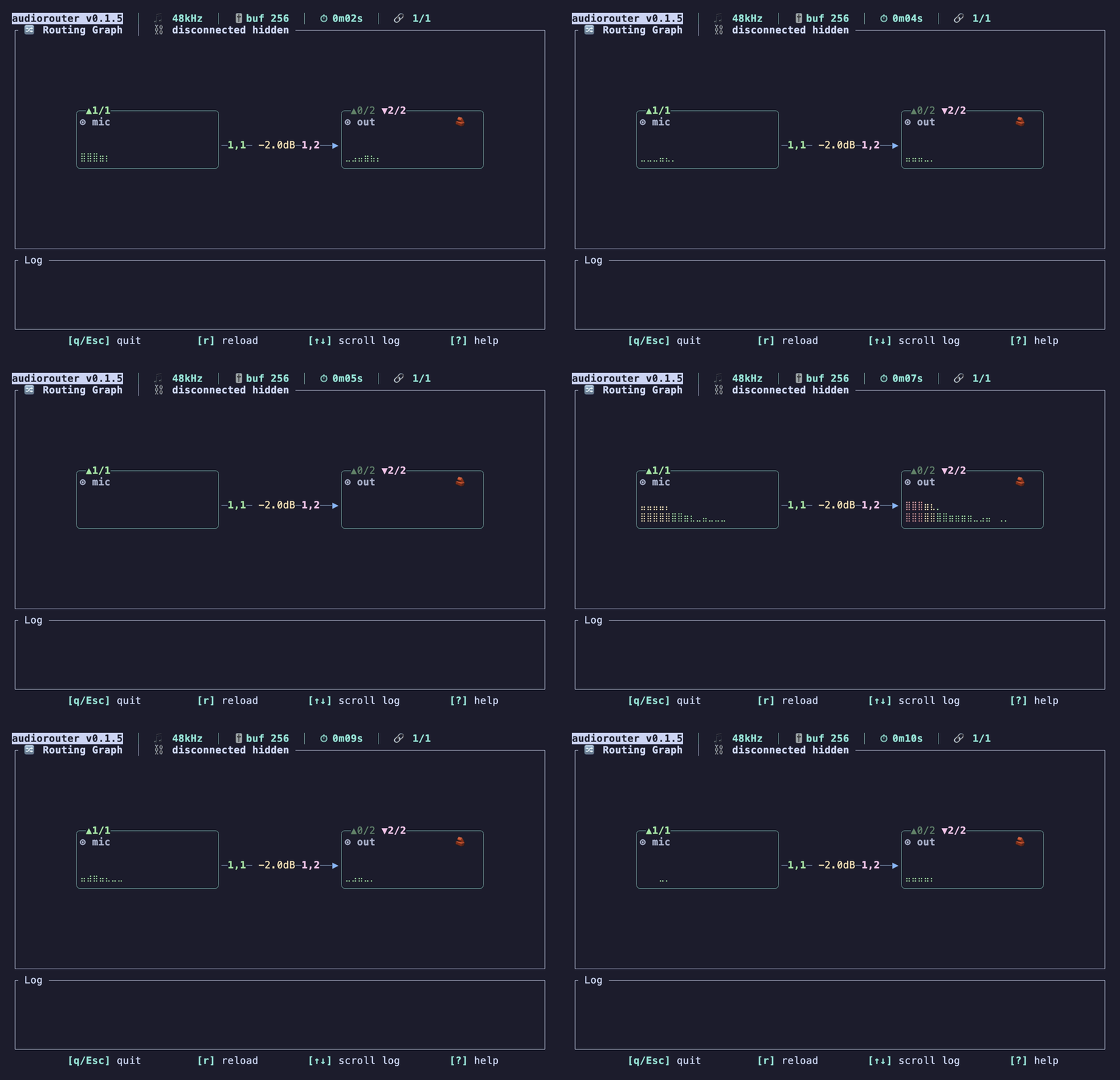
- Terminal UI with live meters and a route graph
- Local web dashboard for config editing, validation, device listing, and live events
- Config file watching with live reload
- Audio device polling for connection/default/channel-count changes
- Shell completion generation for Bash, Fish, Zsh, and other
clap_completeshells - XDG config path with platform-native fallback
Demo
Links
| Resource | URL |
|---|---|
| GitHub | https://github.com/gw31415/audiorouter |
| crates.io | https://crates.io/crates/audiorouter |
| API documentation | https://docs.rs/audiorouter |
| Orynth / ARTR market | https://www.orynth.dev/projects/audiorouter |
| License | Apache License 2.0 |
Installation
Pre-built binary (recommended)
cargo binstall audiorouter
This downloads a pre-built binary from the GitHub Releases page — no compilation step required.
Build from source
git clone https://github.com/gw31415/audiorouter.git
cd audiorouter
cargo install --path .
The dashboard frontend is embedded into the Rust binary at build time. Building from source requires Node.js and pnpm unless you are intentionally reusing an existing dashboard build with
SKIP_DASHBOARD_BUILD=1.
Prerequisites
| Platform | Notes |
|---|---|
| Linux | ALSA headers required (libasound2-dev on Debian/Ubuntu) |
| macOS | No extra dependencies |
| Windows | No extra dependencies |
Quick Start
Find your device names:
audiorouter list-devices
Print the default config location:
audiorouter config-path
Create a TOML config at that path, for example:
[engine]
sample_rate = 48000
buffer_size = 256

[[devices]]
name = "mic"
device = "MacBook Pro Microphone"

[[devices]]
name = "out"
device = "BlackHole 2ch"
limiter = true

[[routes]]
from = "mic"
to = "out"
from_channels = [1, 1]   # mono → stereo
to_channels   = [1, 2]
gain_db = -6.0
Validate the config, then start routing:
audiorouter check
audiorouter
audiorouter with no subcommand is equivalent to audiorouter run.
Web Dashboard
Launch the built-in dashboard:
audiorouter dashboard
By default it binds to 127.0.0.1:7822 and opens the default browser.

Options
# Do not open a browser
audiorouter dashboard --no-open

# Use a different port
audiorouter dashboard --port 9000

# Expose on the local network by binding 0.0.0.0
audiorouter dashboard --host

# Use a specific config file
audiorouter dashboard --config ./config.toml
The dashboard serves the embedded React frontend and an HTTP/SSE API under
/api/*. For the full endpoint reference see Dashboard API.
API-only binary
There is also an API-only development binary:
cargo run -p audiorouter-dashboard --bin audiorouter-dashboard-api -- \
  --addr 127.0.0.1:7822 --config ./config.toml
Environment variables
| Variable | Default | Purpose |
|---|---|---|
AUDIOROUTER_DASHBOARD_ADDR | 127.0.0.1:7822 | Bind address for dashboard/API server binaries |
AUDIOROUTER_CONFIG | platform config path | Config path used by dashboard/API server binaries |
SKIP_DASHBOARD_BUILD | unset | Set to 1 to skip the frontend build in build.rs |
Shell Completions
audiorouter can generate completion scripts for any shell supported by
[clap_complete]: bash, elvish, fish, powershell, and zsh.
# Write to stdout and source immediately (fish example)
audiorouter completions fish | source

# Write to a file
audiorouter completions bash --output ~/.bash_completion.d/audiorouter
When no shell is given, the current shell is detected from $SHELL.
CLI Reference
audiorouter --help
Cross-platform command-line audio router with a terminal UI

Usage: audiorouter [OPTIONS] [COMMAND]

Commands:
  run           Start audio routing (default when no subcommand is given)
  check         Validate configuration and device availability, then exit
  list-devices  List available audio input/output devices, then exit
  config-path   Print the resolved configuration path, then exit
  dashboard     Launch the web dashboard (HTTP/SSE UI) in the default browser
  completions   Generate a shell completion script
  help          Print this message or the help of the given subcommand(s)

Options:
  -c, --config <CONFIG>
          TOML configuration file to read.

          If omitted, audiorouter reads the default XDG config path.

  -q, --quiet
          Suppress non-error output

  -v, --verbose...
          Print extra diagnostics. Repeat for more detail.

          -v:   debug-level tracing (open/close device, route resolution)
          -vv:  trace-level (per-callback timing, underrun counts)

  -h, --help
          Print help (see a summary with '-h')

  -V, --version
          Print version
audiorouter dashboard --help
Launch the web dashboard (HTTP/SSE UI) in the default browser.

By default the dashboard binds to localhost (127.0.0.1) on port 7822.

Usage: audiorouter dashboard [OPTIONS]

Options:
  -c, --config <CONFIG>
          TOML configuration file to read.

          If omitted, audiorouter reads the default XDG config path.

      --host
          Expose the dashboard on the local network (bind 0.0.0.0).

          Off by default, which keeps the dashboard reachable only from this
          machine. Pass `--host` to share it with other devices on the LAN.

  -p, --port <PORT>
          Port to bind the dashboard server on

          [default: 7822]

  -q, --quiet
          Suppress non-error output

      --no-open
          Do not open the dashboard in the default browser

  -v, --verbose...
          Print extra diagnostics. Repeat for more detail.

          -v:   debug-level tracing (open/close device, route resolution)
          -vv:  trace-level (per-callback timing, underrun counts)

  -h, --help
          Print help (see a summary with '-h')
audiorouter completions --help
Generate a shell completion script.

Writes to stdout by default; use --output to write to a file instead.
When no shell is given the current shell is detected from $SHELL.

Usage: audiorouter completions [OPTIONS] [SHELL]

Arguments:
  [SHELL]
          Shell to generate completions for [default: current $SHELL]

          [possible values: bash, elvish, fish, powershell, zsh]

Options:
  -c, --config <CONFIG>
          TOML configuration file to read.

          If omitted, audiorouter reads the default XDG config path.

  -o, --output <OUTPUT>
          Output file [default: stdout]

  -q, --quiet
          Suppress non-error output

  -v, --verbose...
          Print extra diagnostics. Repeat for more detail.

          -v:   debug-level tracing (open/close device, route resolution)
          -vv:  trace-level (per-callback timing, underrun counts)

  -h, --help
          Print help (see a summary with '-h')
Examples
Use an explicit config file:
audiorouter --config ./config.toml check
audiorouter run -c ./config.toml
Increase diagnostics:
audiorouter -v check
# -v  = debug-level tracing
# -vv = trace-level diagnostics
Generate shell completions:
# Write to stdout and source immediately (fish example)
audiorouter completions fish | source

# Write to a file
audiorouter completions bash --output ~/.bash_completion.d/audiorouter
Configuration
Configuration Path
Resolution order when --config is not provided:
$XDG_CONFIG_HOME/audiorouter/config.toml— ifXDG_CONFIG_HOMEis set and non-empty~/.config/audiorouter/config.toml— if the file already exists there- Platform-native config directory:
- Linux/BSD
~/.config/audiorouter/config.toml - macOS
~/Library/Application Support/audiorouter/config.toml - Windows
%APPDATA%\audiorouter\config.toml
- Linux/BSD
Print the resolved path for your system:
audiorouter config-path
Relative paths passed with --config are resolved against the current working
directory.
Config Reference
[engine]
| Key | Default | Description |
|---|---|---|
sample_rate | 48000 | Sample rate in Hz |
buffer_size | 256 | Buffer size in frames |
The entire [engine] table is optional. Missing fields use their defaults.
[[devices]]
| Key | Required | Description |
|---|---|---|
device | yes | Exact device name as reported by list-devices |
name | no | Config-local alias used in routes; defaults to device |
limiter | no | Enable peak limiter when this device is used as an output; default false |
[[routes]]
| Key | Required | Description |
|---|---|---|
from | yes | Source device alias |
to | yes | Destination device alias |
from_channels | yes | 1-based source channel list |
to_channels | yes | 1-based destination channel list |
gain_db | no | Gain in dB; default 0.0 |
mute | no | Mute this route; default false |
from_channels and to_channels must have the same length. Repeat a channel
index to duplicate it, for example:
from_channels = [1, 1]
to_channels   = [1, 2]
That maps mono input channel 1 to stereo output channels 1 and 2.
Larger Example
[engine]
sample_rate = 48000
buffer_size = 256

[[devices]]
name = "vt4"
device = "VT-4"

[[devices]]
name = "mic"
device = "MacBook Pro Microphone"

[[devices]]
name = "blackhole"
device = "BlackHole 2ch"
limiter = true

[[devices]]
name = "speaker"
device = "MacBook Pro Speakers"

[[routes]]
from = "vt4"
to = "blackhole"
from_channels = [3, 4]
to_channels = [1, 2]
gain_db = 0.0

[[routes]]
from = "mic"
to = "blackhole"
from_channels = [1, 1]
to_channels = [1, 2]
gain_db = -8.0

[[routes]]
from = "vt4"
to = "speaker"
from_channels = [3, 4]
to_channels = [1, 2]
gain_db = -12.0
mute = false
Dashboard API
The API is primarily for the bundled frontend, but is useful for development and automation:
| Endpoint | Method | Purpose |
|---|---|---|
/api/config | GET | Load the current config and raw TOML |
/api/config | PUT | Validate and save a config |
/api/config/preview | POST | Convert a config JSON payload to TOML without saving |
/api/config/status | POST | Return validation state plus dashboard status helpers |
/api/validate | POST | Validate config JSON |
/api/devices | GET | List available input/output devices |
/api/runtime | GET | Return the latest runtime snapshot |
/api/events | GET | Server-sent events for config, device, runtime, and log changes |
API Docs (docs.rs)
The full Rust API documentation for every published crate is automatically generated and hosted on docs.rs:
| Crate | docs.rs URL |
|---|---|
audiorouter | https://docs.rs/audiorouter |
audiorouter-core | https://docs.rs/audiorouter-core |
audiorouter-dashboard | https://docs.rs/audiorouter-dashboard |
docs.rs builds API documentation from the source on every publish to crates.io — no manual step required.
Development
This repository is a Cargo workspace:
audiorouter— CLI, terminal UI, routing runtimecrates/audiorouter-core— shared config, validation, device inventory, watchers, and API DTOscrates/audiorouter-dashboard— dashboard HTTP/SSE API and embedded frontend hostcrates/audiorouter-dashboard/dashboard— React/Vite dashboard frontend
Rust
cargo fmt --all
cargo test --workspace
cargo clippy --workspace --all-targets -- -D warnings
Dashboard frontend
cd crates/audiorouter-dashboard/dashboard
pnpm install
pnpm dev
pnpm dev starts both:
audiorouter-dashboard-apiatAUDIOROUTER_DASHBOARD_ADDRor127.0.0.1:7822- the Vite dev server, proxying
/api/*to that API server
Frontend checks:
cd crates/audiorouter-dashboard/dashboard
pnpm check
pnpm test
pnpm lint
pnpm format
Build the embedded dashboard host directly:
cargo run -p audiorouter-dashboard
For pure Rust iterations where a previously built dashboard dist can be reused:
SKIP_DASHBOARD_BUILD=1 cargo test --workspace